Control Room · for macOS

Run more agents.See only what needs you.

Claude Code and Codex in parallel, without the context switching.

Private beta · Apple Silicon · sign in with GitHub

Claude CodeCodexGitHub pull requestsLinear issuesYour own subscriptionsYour MCP servers and skills
Features

From a sentence to a merged pull request

One window from typing a task to shipping it. No terminals to watch, no tabs to juggle: ten agents cost you no more attention than one.

Focus

Built to cut context switching

Ten agents usually means ten terminals to check, and every check is a context switch. Control Room does the checking. Your attention stays on one thread, until another one needs you.

  • A thread comes forward only when the next move is yours
  • Background tests, builds, scripts and merges never interrupt you
  • A status card says where a thread stands, so you are back in it in seconds
  • Answer or archive, and the next thread that needs you opens by itself

Calls you

An agent asks a questionA tool needs your approvalA turn is finishedAn app is open for you to look atA run failed or is blocked

Stays quiet

Tests and builds in the backgroundA script you launchedAn agent merging its own pull requestA thread you snoozedEverything still working
Start

A task, a worktree, an agent. One keystroke.

Type what you want. Control Room creates the git worktree, names the branch after the task and starts the agent in it.

  • Start from a sentence, a Linear issue, a GitHub issue or a pull request
  • Run it on your Mac or in the cloud
  • Snooze it into a backlog that starts by itself later
  • Start & merge: the agent opens the pull request and merges it, QA included
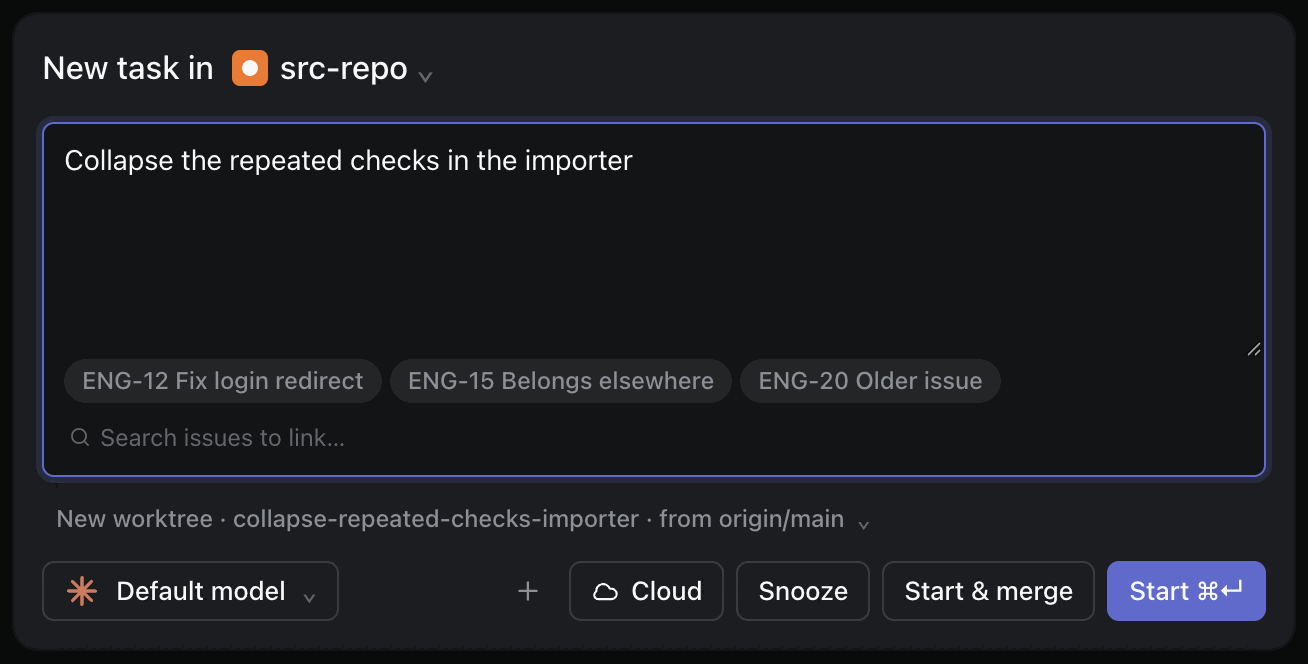
New task: the task text, three Linear issues to link, a new worktree from origin/main, and the Cloud, Snooze, Start and merge and Start buttons
Sorted for you

One list, sorted by what waits on you

Threads sort themselves into Needs attention, Working, Snoozed, Done and Archived. A question from an agent is a card you answer in a click.

  • ⌘J jumps to the next thread that needs you
  • A status card after each long turn: done, next, and your move
  • Notifications, a dock badge and a sound when a thread stops for you
  • Approve tools one by one, or let the agent run in auto, plan or bypass mode
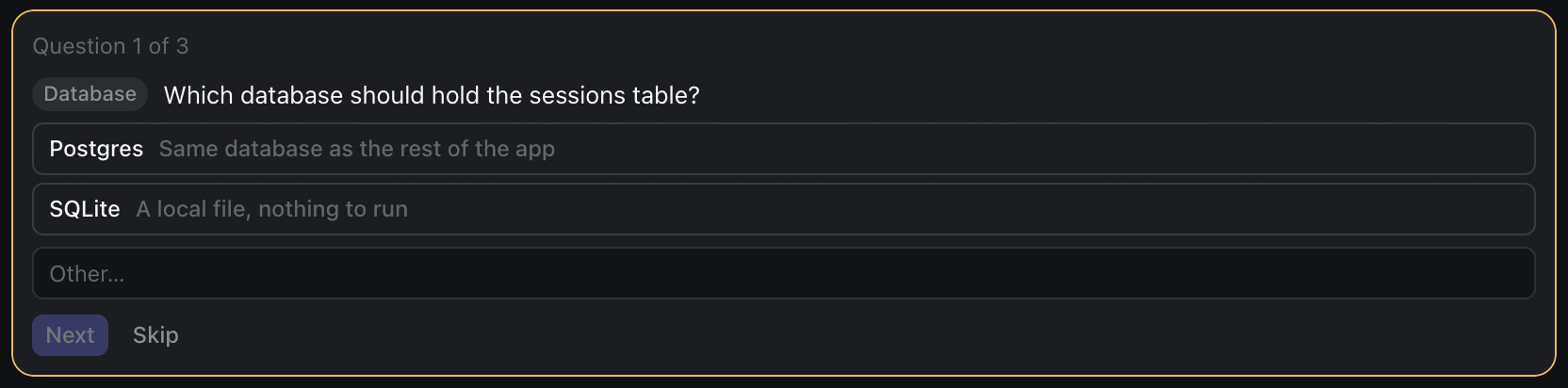
An agent's question card: which database should hold the sessions table, with Postgres and SQLite to choose from A status card: what is done, what comes next, and what you should do
Review

Read the diff, comment, send it back

The whole branch as one diff. Drop comments on lines and they go back to the agent as its next instruction.

  • A summary of files changed after every turn
  • A checkpoint per turn: restore the worktree to any of them
  • File tree, built-in editor and terminals beside the chat
  • Spotlight: try a worktree's changes in your main checkout, live
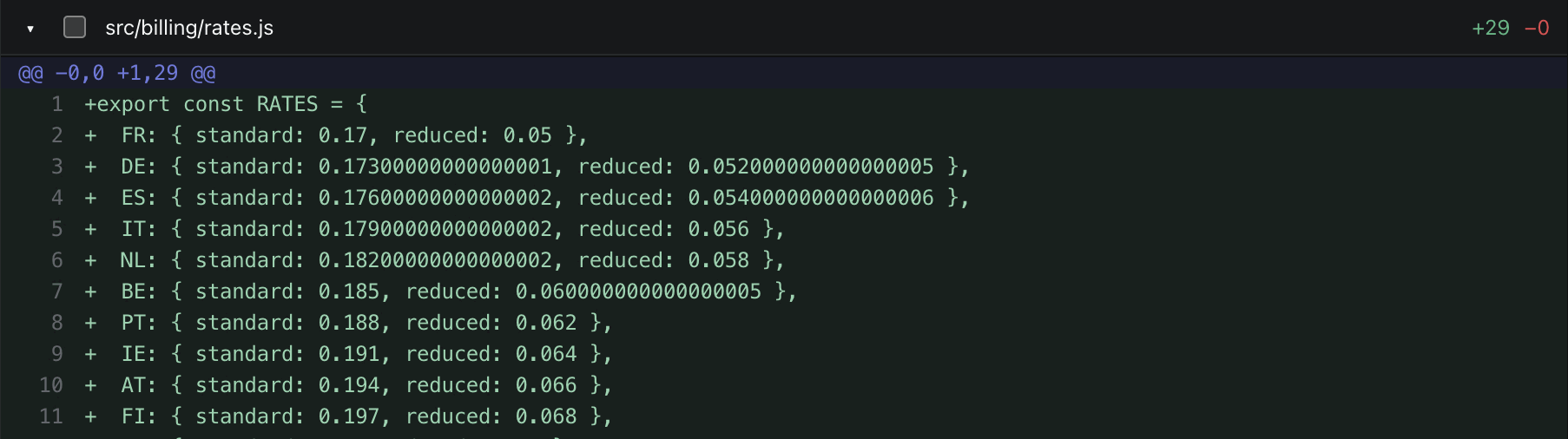
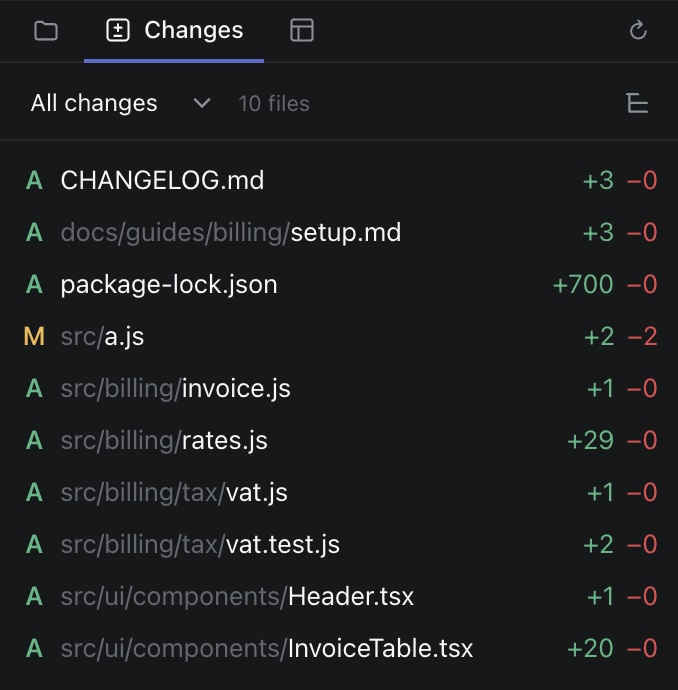
The diff of a new file, src/billing/rates.js, 29 lines added The Changes panel: ten changed files with their added and removed lines
Ship

One next action. Or none: auto-merge.

The header always shows the single thing to do next. Press it and the agent does the work: write the pull request, fix the failing check, answer the review, resolve the conflict. Or start with Start & merge and skip the pressing.

  • Auto-merge: the agent merges once QA, review and checks pass, and stops only when a decision is yours
  • Pull request title and description written from the diff
  • CI checks and reviews followed for you
  • One-click rebase when the base branch moved
  • Merged threads file themselves away, tickets close
⌘⇧↵ Start & merge walks all five for you
Next task

Agents find the next task. You press Start.

While it works, an agent notices what does not belong in its task: a bug next door, a test that already failed, a follow-up. It proposes a new thread, with the brief already written. Start it now, or keep it as a ticket.

  • One click starts it in its own worktree, or runs it here
  • Start & merge takes it all the way without you
  • Create ticket: the agent files it in Linear, for later
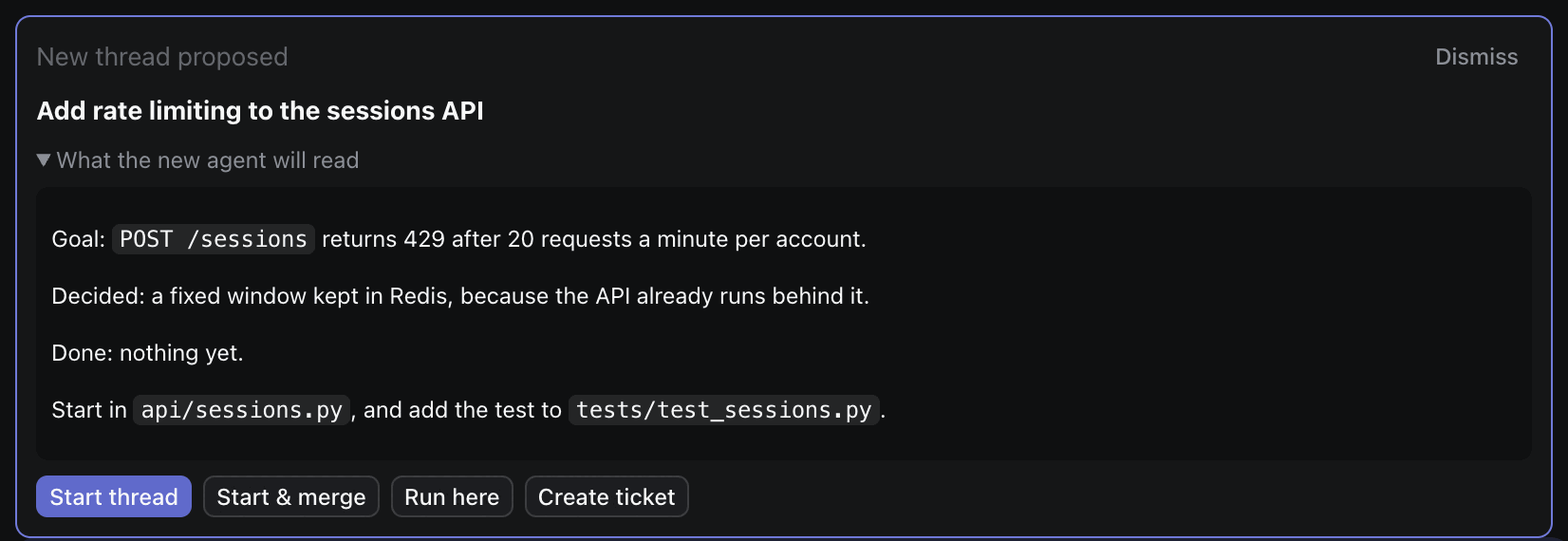
A proposed thread: Add rate limiting to the sessions API, the brief the new agent will read, and the Start thread, Start and merge, Run here and Create ticket buttons
Show

Designs you can click, diagrams you can read

Agents show a new screen as a live mockup before they build it. Pin comments on its parts and send them back in one go. Explanations come with a diagram, drawn in the thread.

  • Interactive HTML mockups, drawn live in the chat
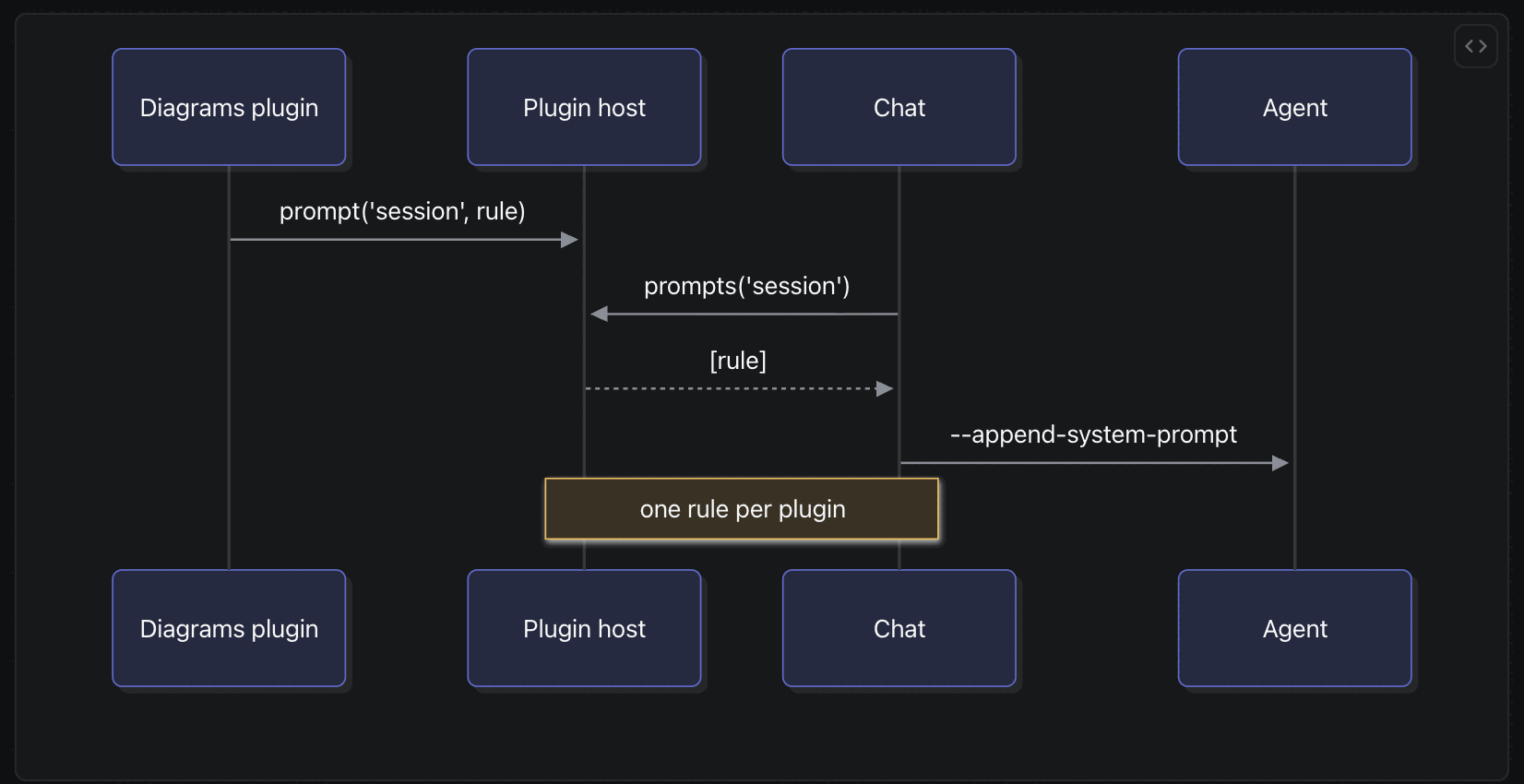
  • Mermaid diagrams: sequences, flows, states, schemas, git graphs, charts of measured numbers
  • Screenshots of the change at the end of the turn
  • Share an artifact by link and collect comments online Soon
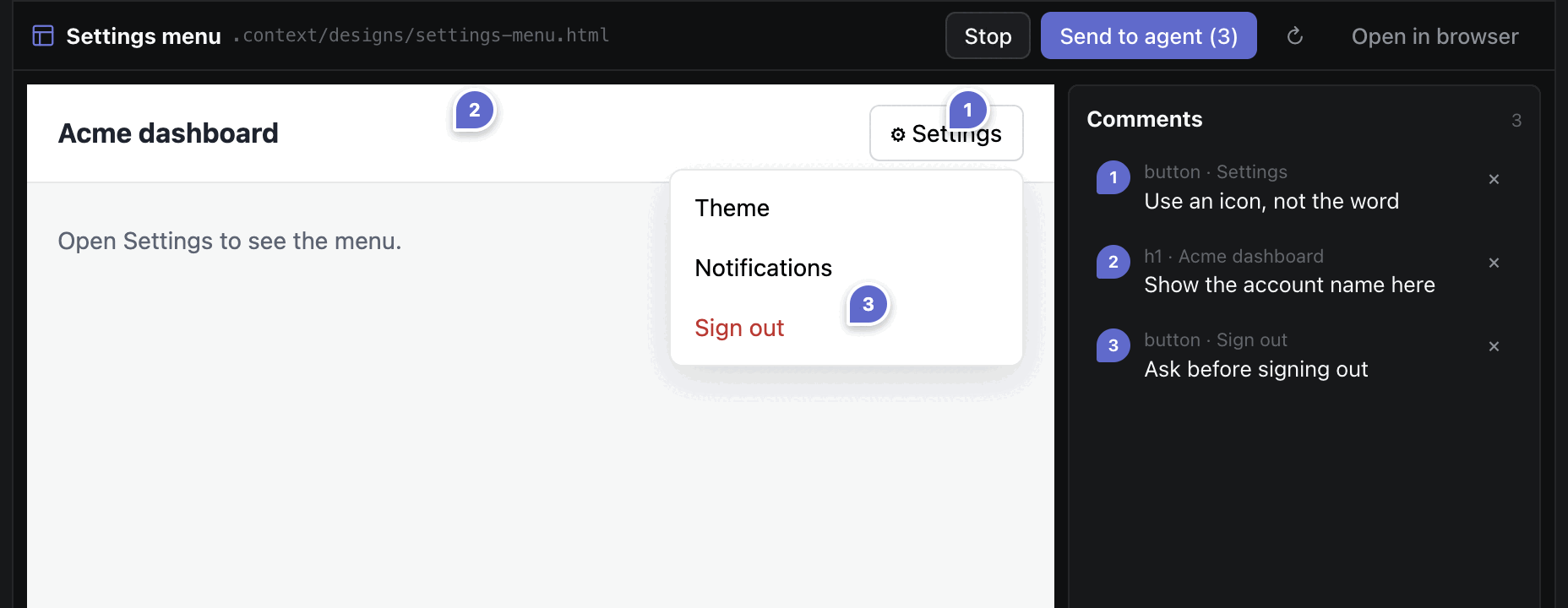
A design preview with three pinned comments, and the Send to agent button A sequence diagram drawn inside a thread

And the rest of the room

Auto picks the account, by usage

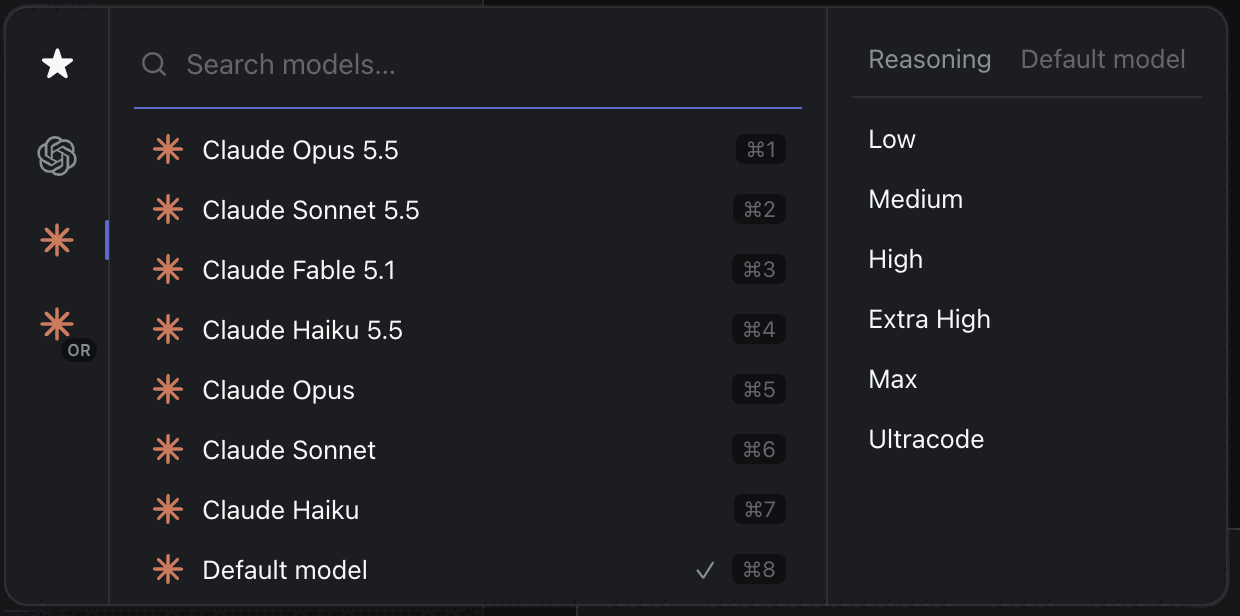
With several Claude accounts, Auto starts each thread on the one with the most left to spend before its reset, and moves a thread that runs out to the next. Each account shows its 5-hour and weekly gauge. Provider, model and effort stay yours to choose, per thread.

The model picker: Claude and Codex models, with reasoning effort from Low to Ultracode

Chat or terminal

A rendered chat with tool cards and diffs, or the agent's own terminal interface. Your choice, per thread.

Several threads per worktree

⌘T opens another agent on the same branch, each with its own model and status.

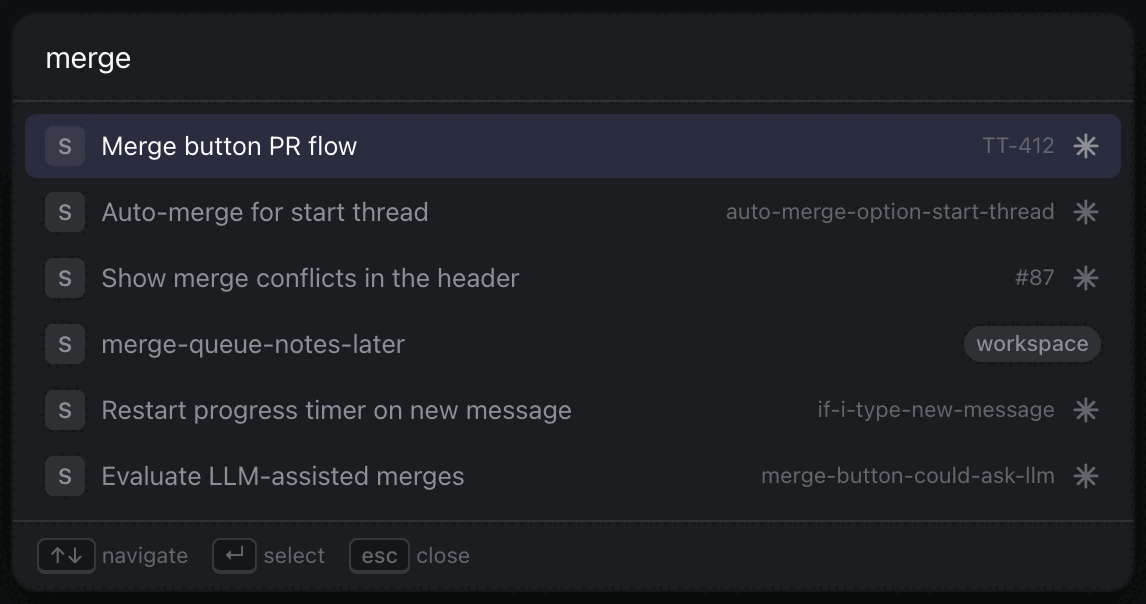
The search palette listing threads that match the word merge

Find any thread

⌘K searches every thread by name, branch, ticket or pull request, across all your repositories.

Scripts per repository

Setup, run and archive scripts, ports and environment for each worktree. Your own prompt buttons in the header.

Linear, both ways

Start from an issue, see issues delegated to agents in the sidebar, and let finished work close its ticket.

Skills and slash commands

/ completes the agent's commands and your project's skills. Your MCP servers come along unchanged.

Plugins

A plugin is a folder with a manifest and one JavaScript file. It reacts to what threads do and gives every agent standing instructions. Design preview, Diagrams and Keep awake ship as plugins; yours stay off until you enable them in Settings.

module.exports = (api) => {
  api.on('thread-state', () =>
    console.log(api.workingAgents()))
  api.prompt('session',
    'Always answer in French.')
}

Graphs in your repository

Mermaid diagrams in your Markdown files are drawn in the diff, like the ones in a thread. Agents add one to the pull request and the ticket too.

Clean endings

Archive, snooze or close a thread. Control Room warns about an open pull request or unpushed commits first.

Agents drive threads over MCP

An agent can list the other threads, read one, start one and message one. You approve each start and each message, unless you chose bypass.

The same on every Mac

Light, dark or system theme, and settings that sync between your computers. Connections never leave the machine.

How it works

Your Mac, your agents, your accounts

Control Room drives the claude and codex you already have. Your code stays in git worktrees on your machine.

Add a repository

From GitHub or a local folder. Control Room keeps its worktrees out of your way, in its own folder.

Start as many tasks as you like

Each one gets a worktree, a branch and an agent. They work at the same time without touching each other.

Answer, review, merge

Work comes back to one list, already sorted. Handle what is waiting on you; the rest keeps running.

Coming next

Night Shift Factory

Control Room is where you direct agents live. The factory is where work runs without you: standing jobs, versioned with your repository, that audit, fix and open pull requests overnight. Connect the two and everything that waits on you lands in the same list.

FAQ

Questions

Which agents does it run?

Claude Code and Codex, with the accounts and subscriptions you already use. You choose the model and the effort for each thread, and can change the model while it runs.

Where does my code go?

Nowhere new. Agents work in git worktrees on your Mac and talk to their own provider, as they do in your terminal. A cloud thread runs in the agent provider's cloud, when you choose it.

Do I need Linear, or the Night Shift factory?

No. Control Room works alone with a git repository. Linear, GitHub issues and the factory are connections you add in Settings when you want them.

What does it need?

A Mac with Apple Silicon, git, and the claude or codex command line signed in. The GitHub CLI gh for pull requests.

How do I get it?

Control Room is in private beta. Sign in with GitHub; approved accounts download the installer from Settings, and the app updates itself from there.

Stop babysitting terminals.

Give every task its own agent, and keep your attention for the decisions.